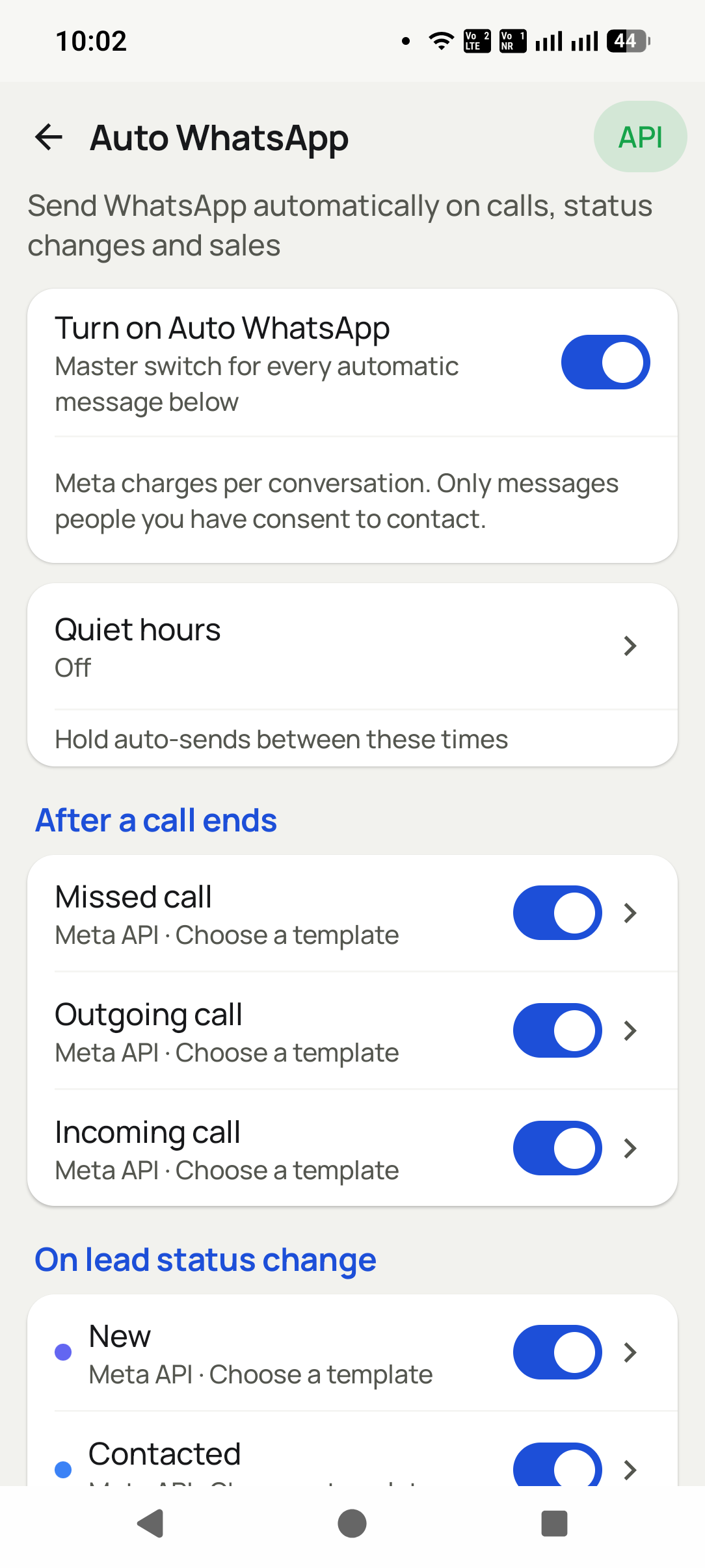
The WhatsApp sends itself the moment the call ends
Set the rule once: when a call finishes, when a lead moves to a new status, or when a product is sold, that customer gets a WhatsApp message on its own — filled in with their details, sent on the official API, logged against their record.
WasYou finish a call meaning to send the details, then forget by the third call.
NowThe message is already delivered before you dial the next number.
On call end
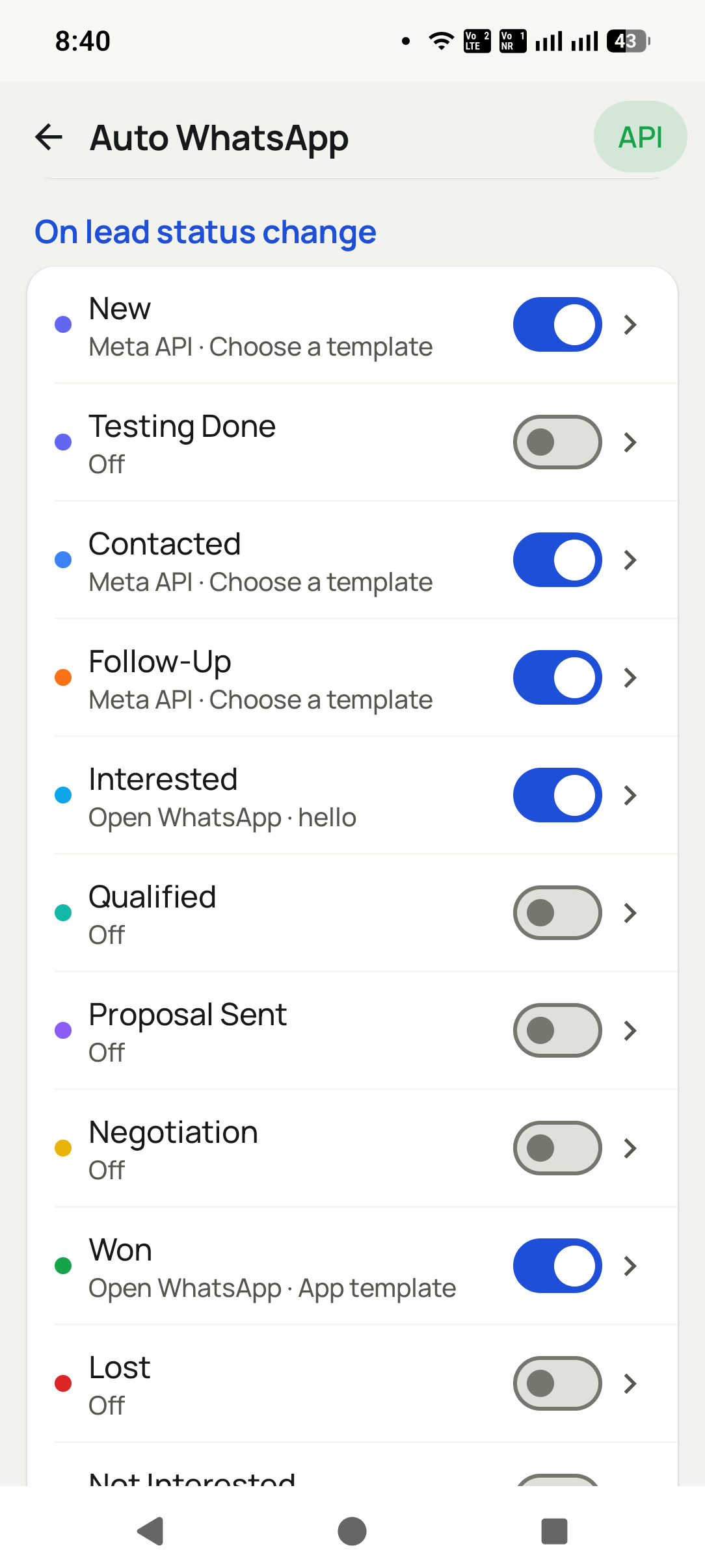
On status change
On a sale
No copy-paste
The headline feature
Automatic WhatsApp when a call ends
This is the rule almost everyone turns on first. The call finishes, and before the caller has even put the phone down, the customer already has the message — the price list, the location, the payment link, the thank-you.
01 Nobody has to rememberThe trigger is the call itself, so the message cannot be forgotten in the rush to the next number.
02 It arrives while you are fresh in mindReaching them seconds after the conversation is worth far more than the same message sent tomorrow evening.
03 Answered or missed, your choiceSend one message after a real conversation and a different one to the calls that never connected.
The difference
Remembering to send it, or it sending itself
Every team already intends to follow up after a call. The gap is never intention — it is the twenty seconds and the memory it takes to actually do it.
✕
By hand, after the call
✓
Automatically, on the call
Depends on the caller remembering
Depends on nothing — the call is the trigger
Copy number, switch app, find wording, paste
Nothing to do. It has already gone
Sent hours later, if at all
Sent within seconds of hanging up
Generic text pasted to everyone
Filled with that customer’s own details
From a personal number that can get banned
On the official WhatsApp Business API
No record of who was actually messaged
Every send logged against the customer
The problem
What this actually fixes
Three things that cost you money today. Open any one to see what it is really costing.
01 PainThe follow-up message never actually gets sentFixThe rule fires the second the call ends, so the message is out before you dial the next number.+
What it costs · You hang up intending to send the price list. Three calls later it is gone from your head, and that customer simply never hears from you again.
02 PainEvery message is retyped from scratchFixOne rule, one approved template, filled automatically with that customer’s own name and details.+
What it costs · Copy the number, switch to WhatsApp, find the wording, paste, fix the name, send. A few minutes per customer, hundreds of times a month, for nothing.
03 PainCustomers hear nothing between stagesFixA status change can trigger its own message, so every stage confirms itself without anybody remembering to do it.+
What it costs · A lead goes from interested, to quoted, to won without hearing a word back. To the customer, silence feels exactly like being ignored.
How it looks
Three taps, start to finish
1
Step 1
Pick the trigger
A finished call, a lead status change, or a product being sold.
2
Step 2
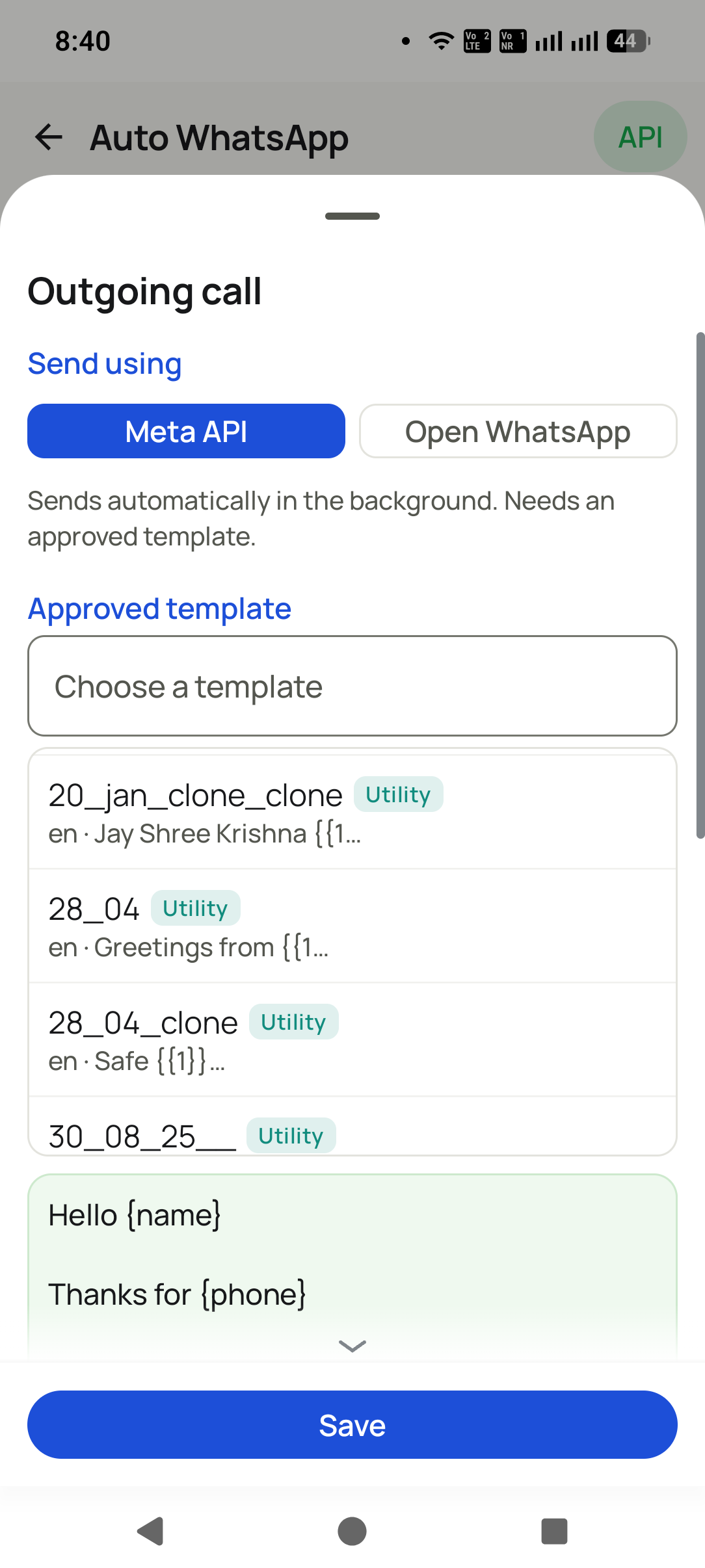
Choose the message
Attach an approved template. The customer’s details fill themselves in.
3
Step 3
It runs on its own
The rule works in the background, logging every message it sends.
What you get
Everything in this pillar
Fires when a call ends — answered, missed or never connected
Fires when a lead moves to a status you choose
Fires when a product or package is marked sold
Sends approved templates on the official WhatsApp Business API
Each message is filled with that customer’s own details
Cooldown, so the same person is never messaged twice in a row
Quiet hours, so nothing goes out at night
Ask-first mode if you would rather approve each send
A full history of what was sent, to whom and when
Different rules for different statuses and products
Already a customer
Meta API panel login
Manage your WhatsApp Business API account in the browser: templates and their approval status,
numbers, campaign reports and delivery logs.
One of three things: a call ending, a lead moving to a new status, or a product being sold. You choose which ones are switched on.
Does everybody get the same text?
+
No. Each trigger has its own message, and each one fills in with that customer's own name and details before it goes.
Will it message people I do not want it to?
+
No. You can leave numbers out completely, and there is a gap enforced between messages plus quiet hours, so nobody gets messaged repeatedly or in the middle of the night.
Do I need the WhatsApp API for this?
+
For messages that go out on their own, yes. Without it, the app can open WhatsApp with the message already typed, and you press send.
Can I see what was sent?
+
Yes. Every automatic message is logged as sent, skipped or failed, with the reason, so nothing happens behind your back.
Next step
Put your own name on it
Your brand, your logo, your colour, your Play listing. The platform underneath is already built and already live.